
Android users are still waiting for developers to truly unlock the potential of expanded notifications. While the standard Google applications like Calendar, Gmail, Messaging, and Google+ have embraced expanded notifications, only a handful of third-party apps have followed suit. Surprisingly, the apps that would most benefit from the new alert system are not the ones that utilize it. Facebook could show more of messages when someone writes on a wall, and Twitter could show full tweets with options to retweet or reply, but neither app does that. Similar disappointment awaits those who wish they could pause a song in Spotify or Pandora, something Google Music has done for several weeks.
The few cases of innovation in Android notifications have mostly come from independent developers or smaller studios. While the official Twitter app has done nothing with expanded notifications, Twitter clients Echofon, Plume, and Falcon Pro all show rich alerts and provide shortcuts to retweet or reply. Even Google has implemented more options into its Google Voice app, but alternative messaging client Go SMS does provide links to reply to messages. Aside from Foursquare and Evernote, few of Android's most popular apps not built by Google have expanded notifications.
Lesser-known apps have experimented with Jelly Bean notifications and produced some excellent results:
- Battery Widget Reborn can show a chart detailing power level, an estimate for when the battery will run out, and disable power-hungry features like auto-sync or Bluetooth.
- PlayerPro, PowerAMP, and Songza follow the example of Google Play Music by including playback controls in the notification area. Album art, song titles, and buttons to pause or skip are included.
- Beautiful Widgets has an optional expansion that shows current temperature and a forecast for the next few hours.

Android Jelly Bean notifications - Google+, Songza, TuneInMore than six months have passed since Google first introduced its enhanced notifications in Android 4.1, and it's disappointing that more apps haven't jumped on the bandwagon. Ad-supported apps unsurprisingly haven't embraced the feature because it's counter-productive to their revenue goals to limit the amount of times someone opens an app and is exposed to an advertisement. But in the interest of improving customer experience, or at least adding another feature available to premium or subscription apps, static notifications keep apps from living up to their full potential.
The desire to put more ads in front of users appears to be the only plausible reason, because difficulty isn't the issue. At their "What's New in Android?" Google I/O session, Google developers Chet Haase and Romain Guy detailed how easily the Android 4.1 notification system could enhanced apps with bigger content views and actions. Google has since posted templates to ease the process and guidelines to show how to best implement notifications.
The absence of actionable or expandable notifications is not a dealbreaker for apps, but it is a nagging reminder that the developer has overlooked one of Android most distinguishing features. Android 4.1 devices have the potential to provide incredibly useful shortcuts and additional context when users drag-down to the notification area; it's time for developers to stop dragging their feet and take advantage of these features.
Read more at http://www.mobileburn.com/21176/editorial/android-jelly-bean-notifications-are-amazing-so-why-dont-more-apps-use-them?#RJryp0dOWGwQe3oo.99
This video will show you how to install the leaked Android 4.2 Jelly Bean APK on your Android device (4.0 and up). It includes a new feature called "gesture typing" which is very similar to Swype. Be sure to leave a comment below!
APK download:
http://www.qbking77.com/android-42-jelly-bean-keyboard-review-and-install.html
Option #2:
Jelly Bean 4.2 Keyboard from the Play Store
Option #3
Kii Keyboard (Jelly Bean 4.2 Keyboard tweaked from the Play Store
Option #1
I have searched all over for a way to make a shortcut to the "Call Log" or "Recent Calls" on the siii ..many people are also asking the same question with no real answer other than downloading a dialer app from market. ..but I have found the activity with nova home launcher ... so here are the directions to make said short cut with the Nova home launcher

1.long press home screen choose shortcuts

2. Activities
3. Contacts (my phone lists 45 contact activities)
4. com.sec.android.app.dialertab.calllog.logselectact ivity
I have also heard mention of "better cut" from google play being able to make shortcuts with no luck in regards to the call log...the confusion may be with the fact that the "call log" is listed as a "contacts" activity rather than a "phone" activity
Source
Option #2
Call Log Shortcut
A simple link to the Call Log for the phones that miss a direct shortcut
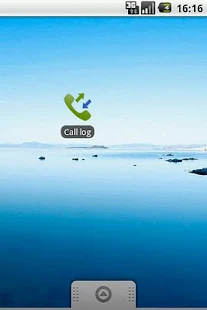
I have searched all over for a way to make a shortcut to the "Call Log" or "Recent Calls" on the siii ..many people are also asking the same question with no real answer other than downloading a dialer app from market. ..but I have found the activity with nova home launcher ... so here are the directions to make said short cut with the Nova home launcher
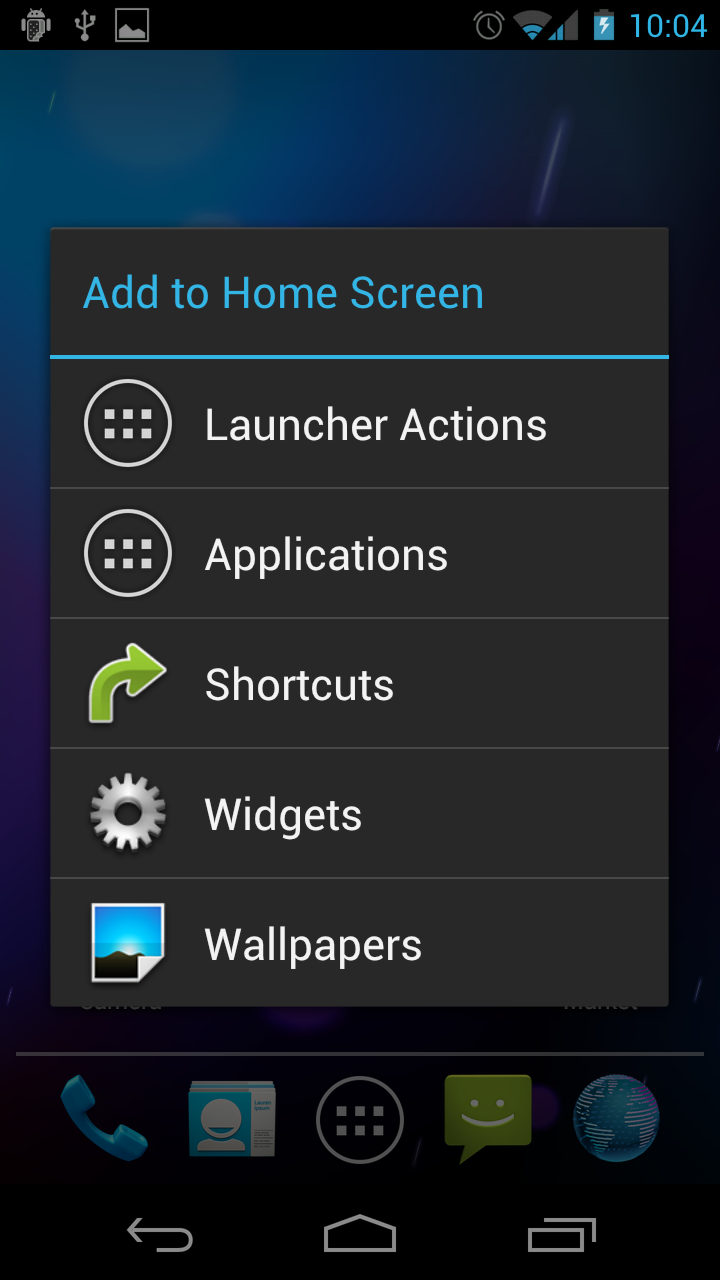
1.long press home screen choose shortcuts

2. Activities
3. Contacts (my phone lists 45 contact activities)
4. com.sec.android.app.dialertab.calllog.logselectact ivity
I have also heard mention of "better cut" from google play being able to make shortcuts with no luck in regards to the call log...the confusion may be with the fact that the "call log" is listed as a "contacts" activity rather than a "phone" activity
Source
Option #2
Call Log Shortcut
A simple link to the Call Log for the phones that miss a direct shortcut

I received a request to share some of the emoji’s now supported in Android 4.1 Jelly Bean, so I thought I’d share with everyone. This is by no means a comprehensive list (you can see from the above image, I’m missing a few), but they could be helpful for those feeling left out of the emoji scene. Enjoy.
Up ↑
Down ↓
Left ←
Right →
Star ★
Smile ☺
Voltage ⚡
Warning ⚠
Victory ✌
Wheelchair ♿
Five-eighths ⅝
Seven-eighths ⅞
Liter ℓ
Soccer ⚽
Woman ♀
Man ♂
Telephone ☎
Phone ✆
Flat ♭
Sharp ♯
Note ♩
Multiplication ❌
Plus ➕
Minus ➖
Divide ➗
Lastly, here are a few more words to type out (but sadly, missing a preview):
snowflake
flower
question, exclamation, circle
paper, rock, scissors
arrow
baseball, soccer, golf
fahrenheit, celsius, degree
aries, taurus, gemini, cancer, leo, virgo, libra, scorpius, sagittarius, capricorn, aquarius, pisces
phone, telephone
airplane, sailboat
aleph
king, queen, bishop, knight, rook, pawn
church, temple
differential
plus, minus, multiplication, divide
trademark
male, female
five-eighths, seven-eighths, one-thirds, two-thirds
happy, heart, star
hourglass
infinity
integral
reference
sharp, flat
wheelchair
warning
voltage
victory
flower
question, exclamation, circle
paper, rock, scissors
arrow
baseball, soccer, golf
fahrenheit, celsius, degree
aries, taurus, gemini, cancer, leo, virgo, libra, scorpius, sagittarius, capricorn, aquarius, pisces
phone, telephone
airplane, sailboat
aleph
king, queen, bishop, knight, rook, pawn
church, temple
differential
plus, minus, multiplication, divide
trademark
male, female
five-eighths, seven-eighths, one-thirds, two-thirds
happy, heart, star
hourglass
infinity
integral
reference
sharp, flat
wheelchair
warning
voltage
victory

For those that missed the original discovery post a few weeks back, here’s a quick walkthrough of how you can enable emoji’s (also known as emoticons) on Android 4.1 Jelly Bean. Simply jump into your Settings > Language & input > Android keyboard (settings) > Add-on dictionaries > Emoji for English words. Mine was being difficult the first time around, so you may have to go back into Add-on dictionaries, click refresh and install again. From there, whenever you type out one of the keywords listed above in the regular Android keyboard, you should see an auto-complete suggestion for an emoji icon. Good luck!
Flash LJ7 Tar via Odin: http://goo.gl/XqZs6
BEFORE: http://i.imgur.com/kqXYv.png
AFTER: http://i.imgur.com/WnZTR.png
THIS IS FOR THE SPRINT VERSION!
Please do NOT try this on another variant!
Download this: http://filecloud.io/zck1g7su
Or you can download: http://goo.gl/KvtUw
Put it on your EXTERNAL sdcard, boot into stock recovery, and install the update.zip like I did in the video.
How To Flash Stock: http://goo.gl/kvloz
Latest SPH-L710 TAR: http://goo.gl/HuoAP
Getting Root back is VERY easy!
Odin TWRP Recovery: http://goo.gl/NyLK8
Then flash SuperSU 0.97: http://goo.gl/WPdln
That will be suitable until the ToolKit is updated.
ALL of my Samsung Galaxy S III Videos can be found here,
http://www.youtube.com/playlist?list=PLA9A2E8458C581B31
If you like my videos, PLEASE consider clicking on the link below, and
Subscribing. It's free and you'll get notified when I upload new videos!
http://www.youtube.com/subscription_center?add_user=wwjoshdew
My unlisted videos can be found here - http://goo.gl/OPrdy
My Favorite YouTube Videos! - http://goo.gl/wdhJZ
If ANY of my links (or mirrors) do NOT work,
PLEASE let me know and I'll fix them ASAP!
To verify MD5's, I recommend WinMD5Sum.
Download WinMD5Sum: http://goo.gl/1Ea7a
Portable WinMD5Sum: http://goo.gl/NZDut
Stalk Me! (For updates on new videos!)
2nd Channel: http://goo.gl/rVCNF
Facebook: http://goo.gl/FR7WH
Instagram: http://goo.gl/Mml6a
Twitter: http://goo.gl/wE3vF
GPlus: http://goo.gl/imdZ1
BEFORE: http://i.imgur.com/kqXYv.png
AFTER: http://i.imgur.com/WnZTR.png
THIS IS FOR THE SPRINT VERSION!
Please do NOT try this on another variant!
Download this: http://filecloud.io/zck1g7su
Or you can download: http://goo.gl/KvtUw
Put it on your EXTERNAL sdcard, boot into stock recovery, and install the update.zip like I did in the video.
How To Flash Stock: http://goo.gl/kvloz
Latest SPH-L710 TAR: http://goo.gl/HuoAP
Getting Root back is VERY easy!
Odin TWRP Recovery: http://goo.gl/NyLK8
Then flash SuperSU 0.97: http://goo.gl/WPdln
That will be suitable until the ToolKit is updated.
ALL of my Samsung Galaxy S III Videos can be found here,
http://www.youtube.com/playlist?list=PLA9A2E8458C581B31
If you like my videos, PLEASE consider clicking on the link below, and
Subscribing. It's free and you'll get notified when I upload new videos!
http://www.youtube.com/subscription_center?add_user=wwjoshdew
My unlisted videos can be found here - http://goo.gl/OPrdy
My Favorite YouTube Videos! - http://goo.gl/wdhJZ
If ANY of my links (or mirrors) do NOT work,
PLEASE let me know and I'll fix them ASAP!
To verify MD5's, I recommend WinMD5Sum.
Download WinMD5Sum: http://goo.gl/1Ea7a
Portable WinMD5Sum: http://goo.gl/NZDut
Stalk Me! (For updates on new videos!)
2nd Channel: http://goo.gl/rVCNF
Facebook: http://goo.gl/FR7WH
Instagram: http://goo.gl/Mml6a
Twitter: http://goo.gl/wE3vF
GPlus: http://goo.gl/imdZ1
Link
http://forum.xda-developers.com/showthread.php?t=2003769

Post development questions/logcats etc here. Post "my data doesn't work" (after reading the OP) in the Q&A thread. The mods don't like the developers thread being filled with these user questions, and it's contrary to the goal of this board. I'll keep both OPs updated.
Q&A thread: http://forum.xda-developers.com/show....php?t=2071252
Q&A thread: http://forum.xda-developers.com/show....php?t=2071252
Huge thanks to the CM devs! Pop on over to http://www.cyanogenmod.org/ and make a donation (scroll to bottom of the page) if you'd like to help support the CM project!
I am not a developer, I'm just a community member maintaining this post.


12/24 - As of 12/24 nightly the officials have working data!
Huge thanks to invisiblek, mastamoon, and aerovan for the awesome unofficials.
Rooting, flashing, installing roms, following any instructions below, will void your phone's warranty and there is a chance (however small) that you'll screw up and permanently break your phone. Anything you do to your phone in violation of the warranty, insurance, or anything else is at your own risk!
I am not a developer, I'm just a community member maintaining this post.
12/24 - As of 12/24 nightly the officials have working data!
Huge thanks to invisiblek, mastamoon, and aerovan for the awesome unofficials.
Rooting, flashing, installing roms, following any instructions below, will void your phone's warranty and there is a chance (however small) that you'll screw up and permanently break your phone. Anything you do to your phone in violation of the warranty, insurance, or anything else is at your own risk!
- If you flash CM10.1 and are roaming/stuck at activating, or don't have data service, see post #2
- There are a lot of questions about how CM10.1 moves your files to sdcard/0/ folder. This is to support multi-users. If you flash back and forth between CM10 and CM10.1 you'll end up with sdcard/0/0/..etc since the upgrade to 10.1 moves your folders into a new /0/. You can safely move your files out of /0/ back to your sdcard if you're on CM10, or back to the first /0 folder if you're on CM10.1.
- Don't update from CM10 to CM10.1 using the built-in cmupdater. Update in recovery for the first flash from CM10 to 10.1. Once on 10.1 you can use cmupdater.
+ Contents
- Two Notes from Cyanogen
- Download Link
- Changelog
- Guides (how to root / backup IMEI)
- Official Google+ Pages
- Known Issues
- Feature Statuses
- Installation Notes
- Installation Instructions
- Post #2 - How to fix roaming/Activating
Quote:
| CyanogenMod 6:13am ET 12/17/12 PSA: Upgrading from CM10 to CM10.1 As you may have noticed, we started updating some devices from cm10 (Android 4.1) to 10.1 (Android 4.2) during the weekend. The upgrade process has been tested extensively for the older devices (manta and mako didn't have that problem since they started out with 10.1), so you should be able to update directly without losing any data. The single application known not to work is the Clock: Our changes to 4.1's clock to add the Stopwatch and Timer in CM10 aren't compatible with Google's own implementation of those features in 4.2 (which we're using in cm10.1); If your clock starts crashing after upgrading to 10.1, simply go into the Settings -> Apps menu, choose Clock from the All tab, and hit "Clear data". https://plus.google.com/117962666888...ts/GLmm5JprLVg |
Quote:
| CyanogenMod - 11:26am ET 12/18/12 CyanogenMod 10.1 Considerations Over the weekend we extended the release of nightlies for CM 10.1 to additional devices. These include: # All Galaxy Nexus Variants # All Nexus 7 Variants (including the GSM enabled 'tilapia') # Transformer Infinity (tf700) # Galaxy Tab 2 7.0 # Galaxy Tab 2 10.1 # Galaxy S (select models) # Galaxy S II (select models) # Galaxy S III (select models) Now this means a lot of you will be upgrading from CM 10.0 and are likely to run into some common items when upgrading. Here are some of the major considerations: # CM 10.1 is based on Android 4.2.1. Any and all proprietary applications that you have installed outside of CM should be updated to their 4.2.1 counterparts. Do not use the 4.1 versions of proprietary applications, else you will experience difficulties. # Do not use the CyanogenMod Updater to go from 10.0 to 10.1. While you will have a functional rom, due to the 1st bullet point, you will be left without your proprietary applications and their data. We highly suggest performing the initial install manually via recovery (flashing CM and your addons). Once you are on 10.1, you can use the CM Updater as per normal. # You do not need to wipe when updating to 10.1 if coming from and earlier CM version. However, as we mentioned in the weekend's PSA, users updating (instead of wiping) will experience a conflict in the application data for the Clock app. You are advised to clear this apps data on first boot of 10.1. # Another item to note is that the support for the 10.0 feature that allowed for an expanded number of targets on the pattern lockscreen is not in 10.1. If you use this lockscreen, disable it before updating to 10.0. # Finally, we always advise that you create a backup before any update. Do note, however, that due to Android 4.2 changes to support multi-user mode, your backups will automatically be transferred to /sdcard/0/[backup folder]. Remember this when attempting to restore 10.0. https://plus.google.com/117962666888...ts/9X561GFMxL5 |
Official download link: http://get.cm/?device=d2vzw (Only flash the 12/24 or later nightlies.)
Nightly Change Log:
Quote:
Originally Posted by invisiblek

CM10.1 changelog app, will contain the same information you'd fine here: http://10.1.cmxlog.com/
https://play.google.com/store/apps/d...k.cm.nightlies Make sure you select your device using the wrench in the upper right, it'll probably error right away because I haven't fixed it up all the way yet and it's looking for a device that doesn't have 10.1 yet to begin with. |
-+-+-+-+-+-+-+-+-+-+-+-+-+-+-+-+-+-+-+-+-+-+-+-+-+-+-+-+-+-+-+-+-+-+-+-+-+-+-+-+-+-+-+-+-+-+-+-+-+-+-+-+-+-+-+-+-+-+-+-+-+-+-+
Guide on how to Root and Flash: http://forum.xda-developers.com/show....php?t=1762709
How to Backup and Restore your IMEI: http://forum.xda-developers.com/show...light=nvbackup
-+-+-+-+-+-+-+-+-+-+-+-+-+-+-+-+-+-+-+-+-+-+-+-+-+-+-+-+-+-+-+-+-+-+-+-+-+-+-+-+-+-+-+-+-+-+-+-+-+-+-+-+-+-+-+-+-+-+-+-+-+-+-+
Official Google+: https://plus.google.com/+CyanogenMod/posts
Official Google+ Community: https://plus.google.com/communities/...56059326217974
-+-+-+-+-+-+-+-+-+-+-+-+-+-+-+-+-+-+-+-+-+-+-+-+-+-+-+-+-+-+-+-+-+-+-+-+-+-+-+-+-+-+-+-+-+-+-+-+-+-+-+-+-+-+-+-+-+-+-+-+-+-+-+
Known/Reported Issues:
12/24 - pictures show as videos in gallery (fixed in 12/26. Wipe Gallery and Media Services data then reboot to fix if dirty flashing)
12/24 - incorrect data settings on first boot requiring you to read post 2 to fix
12/28 - issues with music players freezing or not playing audio
12/28 - in call volume is stuck (and slightly low) for some people
-+-+-+-+-+-+-+-+-+-+-+-+-+-+-+-+-+-+-+-+-+-+-+-+-+-+-+-+-+-+-+-+-+-+-+-+-+-+-+-+-+-+-+-+-+-+-+-+-+-+-+-+-+-+-+-+-+-+-+-+-+-+-+
Key Feature Statuses:
Call Quality: There should not be any remaining echo (in calls or on skype).
Bluetooth:
SMS: Group SMS works
MMS: Works, images are low quality
GPS: Works. If you're having problems see post #2
Camera: Works. No photosphere is included on non-nexus devices.
Camcorder: Audio records in stereo. Audio is still softer than stock TW.
Data: Works starting on the 12/24 nightly.
NFC: Works
Tethering: reported to work when set to 'open'
Developer Options: Menu > Settings > About Phone. Tap build number 7 times to unlock Developer Options
-+-+-+-+-+-+-+-+-+-+-+-+-+-+-+-+-+-+-+-+-+-+-+-+-+-+-+-+-+-+-+-+-+-+-+-+-+-+-+-+-+-+-+-+-+-+-+-+-+-+-+-+-+-+-+-+-+-+-+-+-+-+-+
Installation Notes:
- CM can be flashed using CWM or TWRP. Only use the latest TWRP or CWM!
- When you install CM10.1 your data will be moved to a new folder /0/ (this is to support multi-users).
- Make sure you have the latest CWM or TWRP installed so that your recovery isn't confused by the new location of your backups. Official TWRP d2vzw or Latest CWM(scroll down to Samsung Galaxy S3 (Verizon))
- GAPPS is not included in any CM download. You must flash a gapps zip if coming from another rom or when starting with a clean install. You do not need to flash gapps when 'dirty flashing' over a previous CM install. Download gapps here.
- According to Cyanogen it is possible to flash CM10.1 over top of an existing CM10 installation. It is generally recommended to do a clean install if you run into any issues.
- Always make a backup before you try a dirty flash or upgrade to CM10.1.
-+-+-+-+-+-+-+-+-+-+-+-+-+-+-+-+-+-+-+-+-+-+-+-+-+-+-+-+-+-+-+-+-+-+-+-+-+-+-+-+-+-+-+-+-+-+-+-+-+-+-+-+-+-+-+-+-+-+-+-+-+-+-+
How to install over CM10:
- Consider backing up your IMEI if you haven't already (link)
- If you use a lockscreen pattern disable it
- Flash the latest CWM or Official TWRP d2vzw
- Download a CM10.1 rom (nightly or unofficial) to your sd card
- Download the 20121212 gapps from goo to your sd card
- Reboot into recovery
- Make a backup
- Wipe cache and dalvik (if you want)
- Install CM10.1 zip
- Install gapps
- Reboot
- After your phone boots go into Menu > Settings > Apps. Under "All" find "Clock", open it, and click "Clear Data"
How to install coming from any rom other than CM:
- Consider backing up your IMEI if you haven't already (link)
- Flash the latest CWM or Official TWRP d2vzw
- Download a CM10.1 rom (nightly or unofficial) to your sd card
- Download the 20121212 gapps from goo to your sd card
- Use an app like Titanium Backup or Mybackup Pro to backup your apps (if you want)
- Use an app like SMS Backup+ to backup your text messages and call log (if you want)
- Reboot into recovery
- Make a backup
- Wipe cache and dalvik (if you want)
- Wipe Data/Factory Reset/System
- Install CM10.1 zip
- Install gapps
- Reboot
- Reinstall Titanium Backup/Mybackup Pro/SMS Backup+ and restore the stuff you have to have, but its better to reinstall things from the market if possible (keep in mind your backups will be located in sdcard/0/) (if you want)
Fixing Data
If you flashed a CM10.1 nightly and are stuck at roaming/activating or don't have data, try the following (in order of simplicity):
If you flashed a CM10.1 nightly and are stuck at roaming/activating or don't have data, try the following (in order of simplicity):
Quote:
| (1) Go into Mobile Settings - Mobile Networks. Change CDMA mode to RUIM, go into airplane mode, come out, it should login to 4g in a minute. |
Quote:
| (2) Power down. Take out the sim card and reboot. In mobile network settings set roaming to auto and the subscription to RUIM/SIM, turn off the phone, pop the sim card back in, boot up. |
Quote:
| (3) Wiping in recovery and restoring a backup (that fixed it for me), then reflash to 10.1. |
Quote:
Quote:
|
Fixing GPS
Quote:
Originally Posted by invisiblek
GPS - it HAS been working for 98% of builds, however if you cannot get GPS to connect, possibly due to dirty flashing, the following has worked every build for me: Settings - Apps - downloaded - GPS Status - clear cache, clear data, force stop. Then open gps status back up, let it sit with gps on for a moment and see if it starts searching for signal again....if this still doesn't work (sometimes) - settings - apps - all - google services framework - clear data. This has worked 100% of the time but I try to avoid it because if you do this, you need to go open back up the play store and see if it still connects. If not, recovery - clear cache, clear dalvik usually takes care of that.
Clean install of builds has given me 100% functional gps every time. |
Unofficial CM10.1
(I know several people have posted these, I looked quickly and only found mastamoon's which is also what I am running, I'll happily post more here if I find them).
Quote:
| mastamoon http://d-h.st/users/mastamoon |
Quote:
| invisiblek http://rootzwiki.com/topic/35602-rom...0#entry1058210 |
Quote:
| aerovan http://rootzwiki.com/topic/37216-uno...zw-2012-12-18/ |


